Testing Jurni Funnels Against Your Existing Website Pages
Last updated: June 29, 2026
Last updated: June 2026
Overview
You can run an experiment that tests a Jurni agentic shopping journey against an external destination: your existing Shopify product page (PDP), a page on your own site, or any URL you control. Using your current page as a control variant establishes a baseline and answers the most important question in CRO: does Jurni actually outperform what you already have? Including your existing page is the most rigorous way to measure true incremental lift.
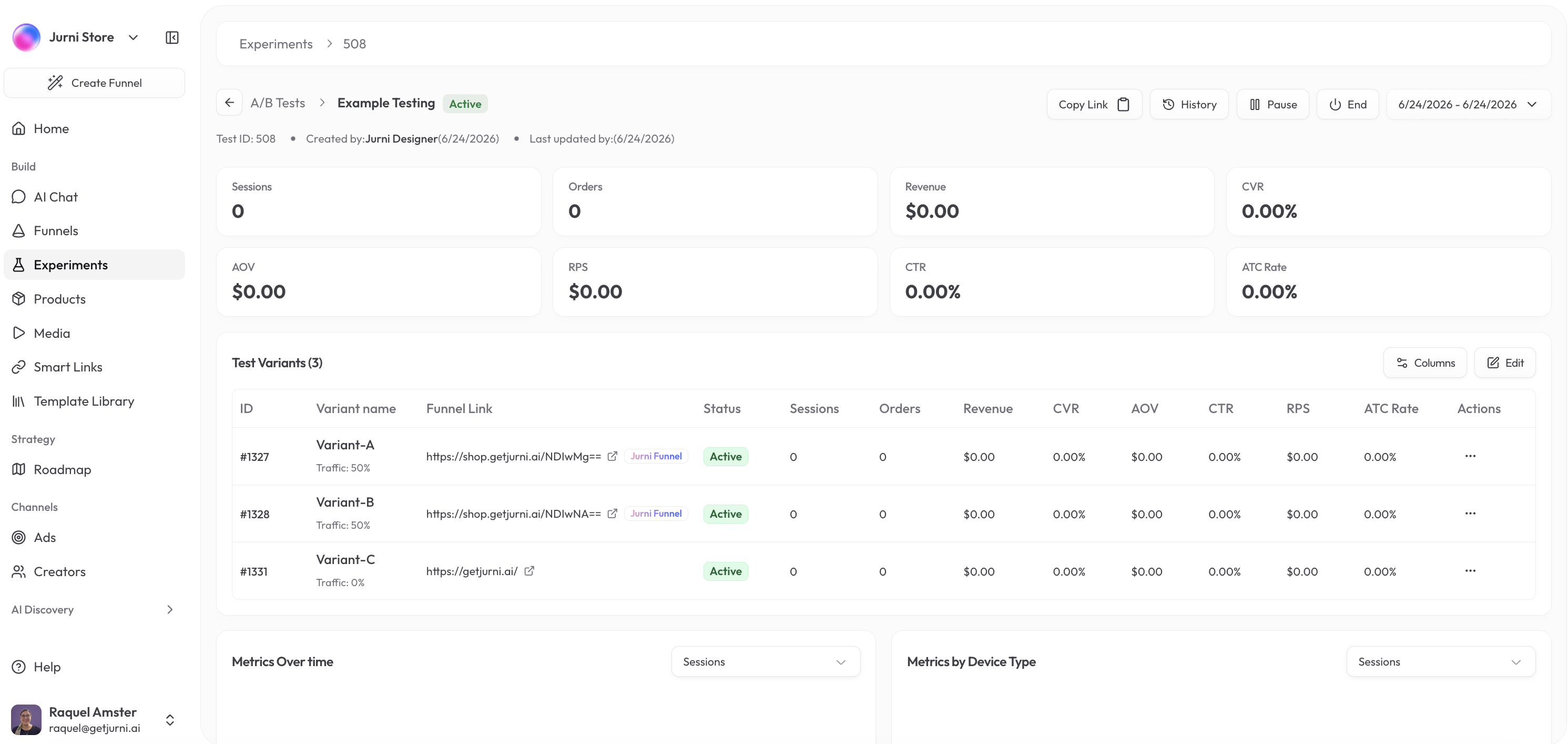
Why include your existing page as a control
Sending traffic to your existing page alongside your Jurni variants establishes a baseline. Without one, you learn which Jurni variant wins, but not whether either beats your status quo. A three-way experiment, for example one control plus two Jurni variants, answers both questions in a single test.
How to set up the experiment
Go to Experiments and select Create Experiment.
Name the experiment and select your SmartLink.
Add your control. Select Add Variant, choose External URL, and paste the URL of your existing page or PDP.
Add your Jurni journey, or journeys, as additional variants.
Set traffic allocation across all variants. Equal splits, such as 33/33/33 for three variants, give the cleanest comparison.
Select Save and Start Test.
Tip: Use your Shopify product page as the control and a Jurni journey as the challenger. This gives you a direct comparison against your current baseline.
Running three-way experiments
A three-way experiment, one control plus two Jurni variants, is a common setup. It lets you measure the baseline lift from Jurni and compare two Jurni approaches, for example a long-form journey against a pre-lander, in a single test. The trade-off is that you need more traffic to reach significance across three buckets, so plan for at least 300 sessions per variant.
How traffic routing works
Jurni's SmartLink splits incoming traffic across your variants according to the allocation you set. Visitors assigned to an external URL variant are sent directly to your existing page. Jurni's pixel, installed via the Core Script on your Shopify store, tracks conversions from both paths.
When Jurni routes traffic to an external URL, it automatically appends experiment and variant UTM parameters, so your existing analytics tools receive the referral data. For the most accurate comparison, keep your existing page's own UTM tagging consistent with Jurni's. The exact parameter names appear in the experiment setup screen when you configure the external URL variant.
How attribution works for external destinations
Jurni tracks sessions and clicks through the SmartLink for every variant, including external ones. Revenue is different:
Sessions and clicks are tracked by Jurni at the SmartLink level.
Revenue attribution relies on your own tracking setup. Jurni cannot read conversion or revenue data from external pages directly.
Revenue for an external variant shows as 0 in Jurni's dashboard unless you have configured passthrough attribution.
To compare revenue across variants, cross-reference Jurni's session data with your Shopify reports, GA4, or your Meta Pixel. Without this step, a revenue comparison between a Jurni journey and an external URL may not be apples to apples.
Getting clean revenue data for external variants
Use the UTM parameters Jurni appends to segment sessions in GA4 or Shopify.
In Shopify Analytics, filter orders by the UTM source or campaign that matches the experiment variant.
Compare that revenue to what Jurni reports for the Jurni journey variant.
If you are running Meta ads, make sure your Meta Pixel fires on the external page's order confirmation page so Meta can attribute those purchases.
Campaign setup for clean isolation
In a CBO (Campaign Budget Optimization) campaign on Meta, the algorithm shifts budget toward ad sets showing early purchase signals, not toward page performance. This can distort your results. For cleaner isolation:
Use ABO (Ad Set Budget Optimization) with a fixed budget per ad set.
Point each ad set to its corresponding SmartLink variant.
Keep creative identical across ad sets, so the only variable is the destination.
Knowing when results are valid
Aim for at least 300 sessions per variant before drawing directional conclusions, and wait for 500+ sessions per variant at 95%+ confidence in the Experiments dashboard before calling a winner. Lower traffic can be directionally useful, but don't optimize against it.
Frequently asked questions
Will my existing page affect Jurni's experiment data? No. Each variant's session and conversion data is tracked independently, so the external variant's data does not contaminate the Jurni variants.
Will Jurni show revenue for the external URL variant? Jurni shows click-throughs and sessions for the external variant, but cannot pull revenue from external pages directly. That revenue shows as 0 unless you have configured passthrough attribution, so cross-reference with Shopify or your analytics platform.
Can I test Jurni against multiple external pages at once? Yes. You can add multiple external URL variants to the same experiment.
Can I use any external URL, not just Shopify? Yes. Any publicly accessible URL works, including custom domain pages and other platforms.
What if my existing page doesn't have UTM tracking? Add UTM parameters to the external variant URL when you set it up in the experiment. This ensures Shopify attributes those sessions correctly.
Need a hand?
Reach out to our team and we'll help you set up your first control experiment.