Custom Scripts: Adding Third-Party Tracking Pixels
Last updated: September 2, 2026
Last updated: June 2026
Overview
Add any third-party script to your Jurni funnels via custom script injection. This lets you install tracking pixels, heatmap tools, widgets, and other tags that do not have a native Jurni integration. Scripts can be scoped globally (all funnels) or per funnel.
Adding a Custom Script
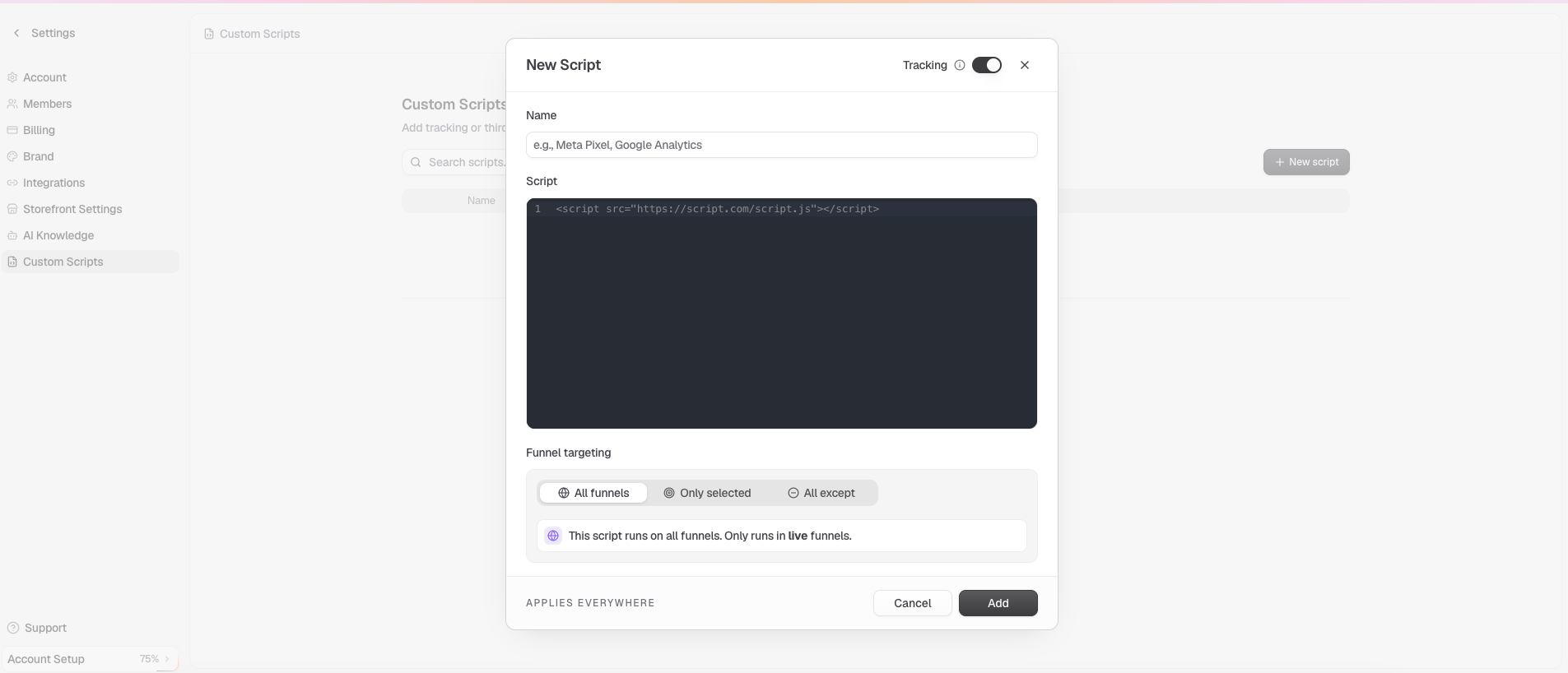
Go to Settings → Custom Scripts.
Click New Script.
Name your Script
Paste your Script
Choose your Tracking set up
Default-Toggle On: Tracking scripts are hidden in preview mode and only run on the live funnel.
Toggle Off: Tracking scripts are always on both on preview and live funnels.
Select Funnel Targeting- you can only choose one option
All Funnels
Only selected
All except
Click Add.
Common Use Cases
TikTok Pixel — Add via custom script if not using a native integration.
Pinterest Tag — Per-funnel or global depending on your campaign structure.
Snap Pixel — Global script for account-wide Snapchat tracking.
Hotjar — Body placement for session recording and heatmaps.
Microsoft Clarity — Body placement for click tracking and session replay.
Within your Microsoft clarity project → Settings → Setup → Get tracking code. Add it directly into the Jurni Settings → Custom Scripts
Chat widgets — Body placement for tools like Gorgias or Tidio.
Tip: Avoid duplicating pixels that already have native Jurni integrations. If you've connected Meta Pixel or GA4 through Settings → Integrations, do not also add those via custom scripts. Double-loading causes duplicate events and inflated reporting.
Frequently Asked Questions
When do custom scripts fire?
Scripts fire on page load, the same as native integrations.
Can I add multiple custom scripts?
Yes. There is no hard limit. Scripts fire in the order they are listed.
Can I edit or delete a script after saving?
Yes. Click the script row in the Custom Scripts list to edit or delete it.
Do custom scripts work in editor preview mode?
Most scripts fire in preview, but some third-party tools block themselves in non-production environments. Test on a live or staged funnel URL to confirm behavior.